TileBook Buy — ₹7,999

Tile shop counter software

Bill by box.
Stock by shade.
Khata by party.

TileBook is an offline billing, stock and khata app for tile dealers. GST invoices, shade and batch tracking, contractor dues and reports — on one Windows or Mac computer, with no monthly fee.

  • Offline — no internet needed
  • One-time licence
  • GST invoices
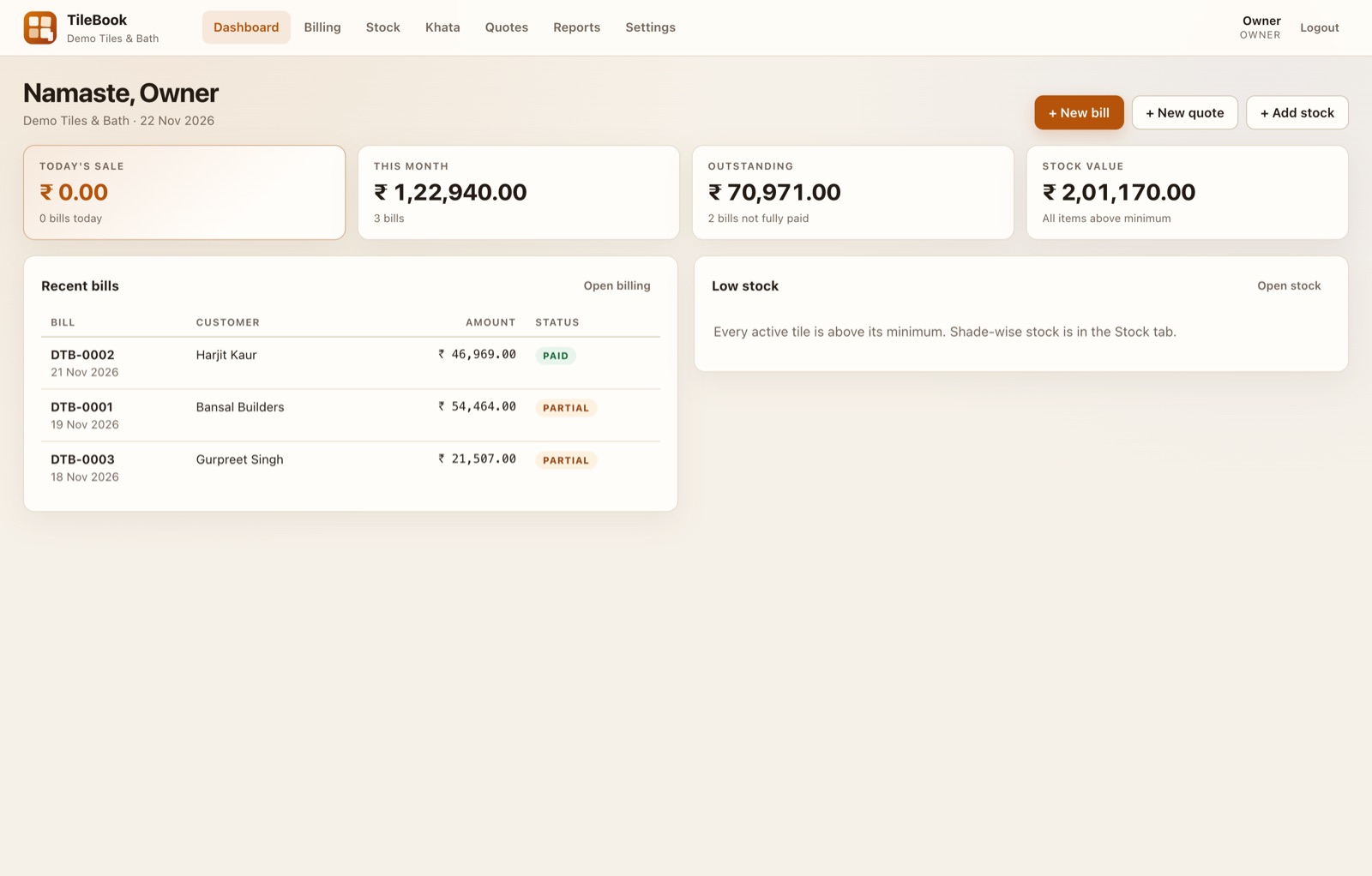
TileBook dashboard showing this month's sale, outstanding khata, stock value and recent bills with paid and partial status

Swipe the screenshot to pan

01

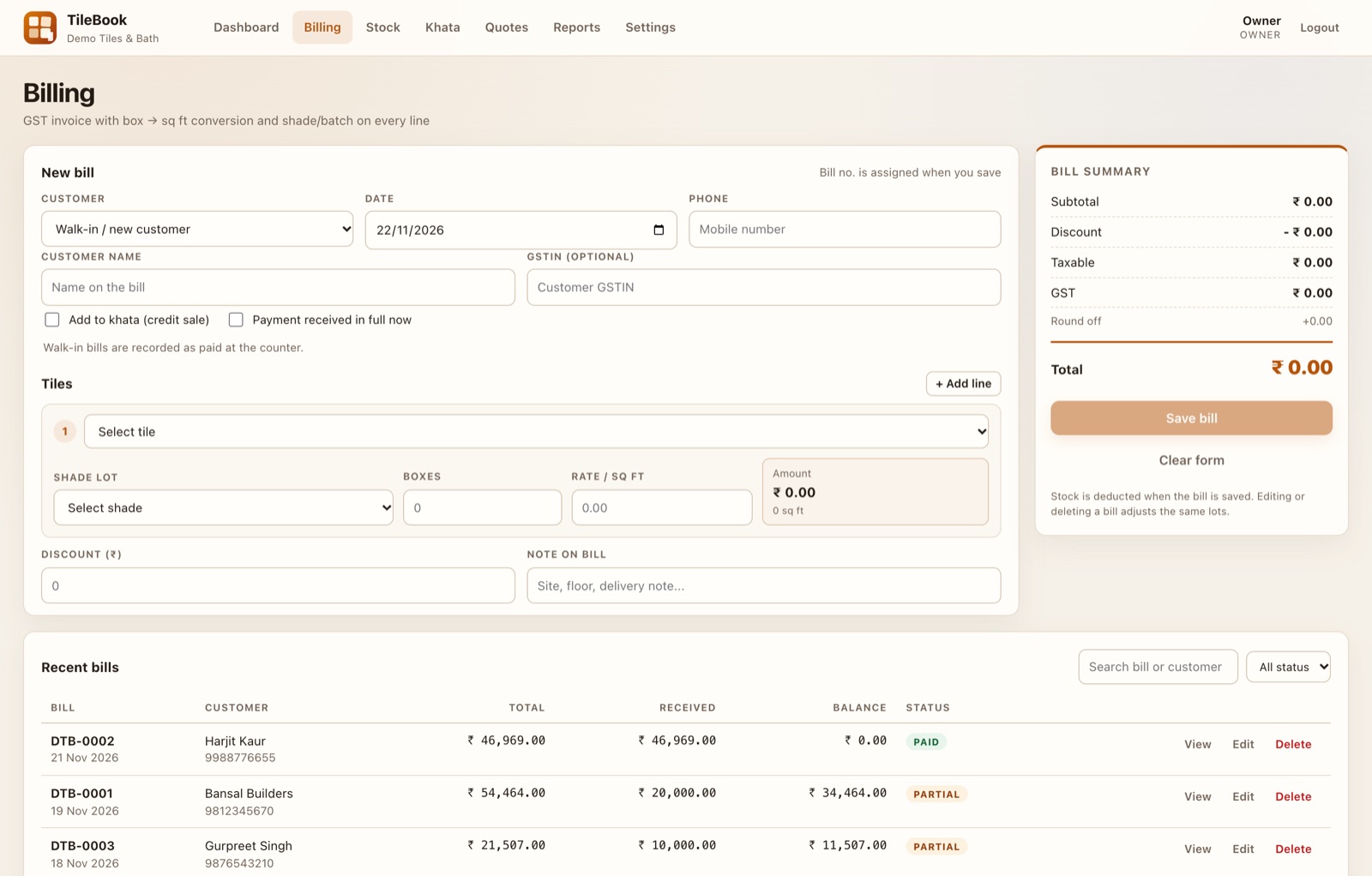
The bill book — boxes, square feet, GST and the print-out.

02

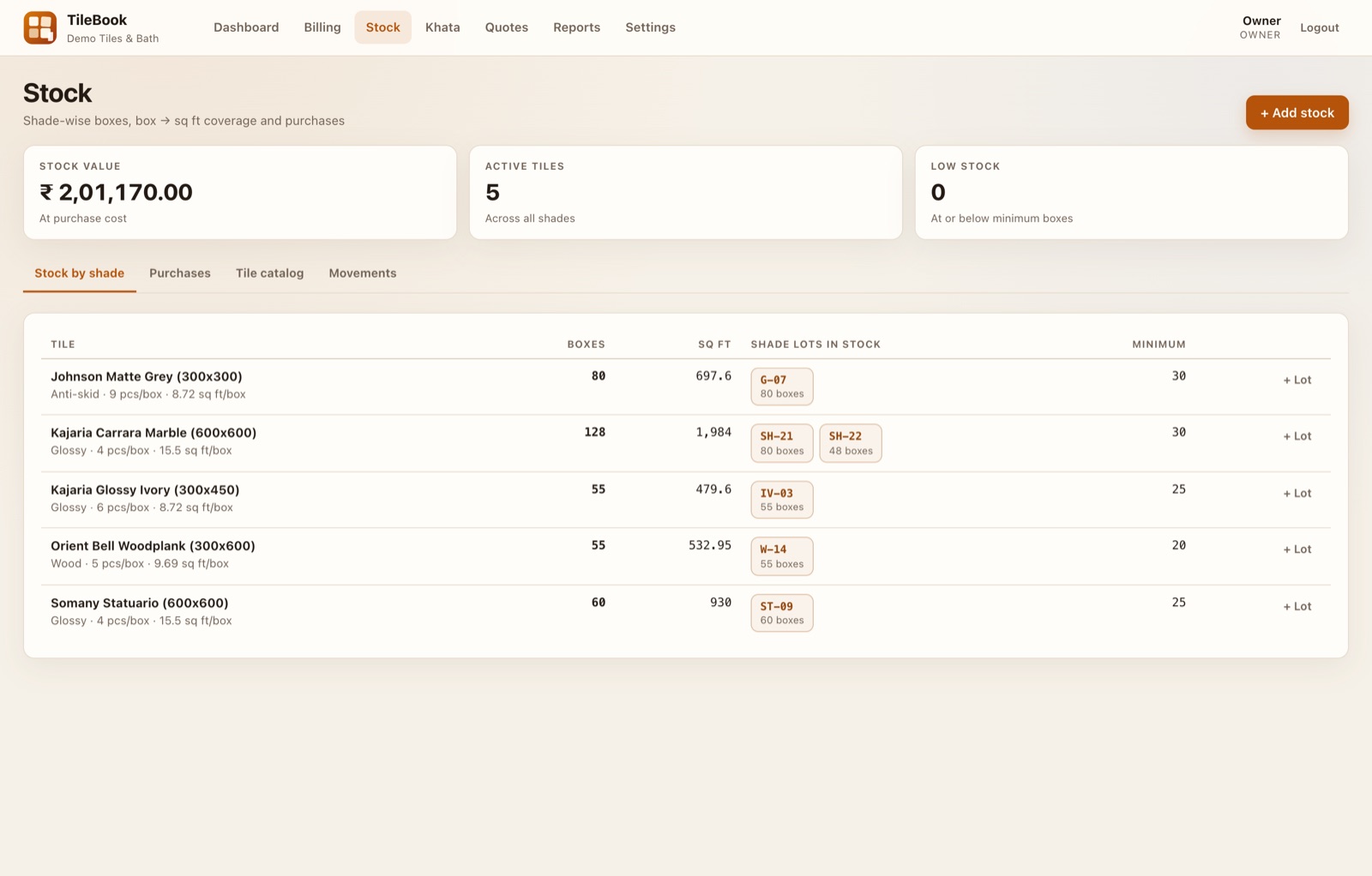
The stock register — shades, lots and what is below minimum.

03

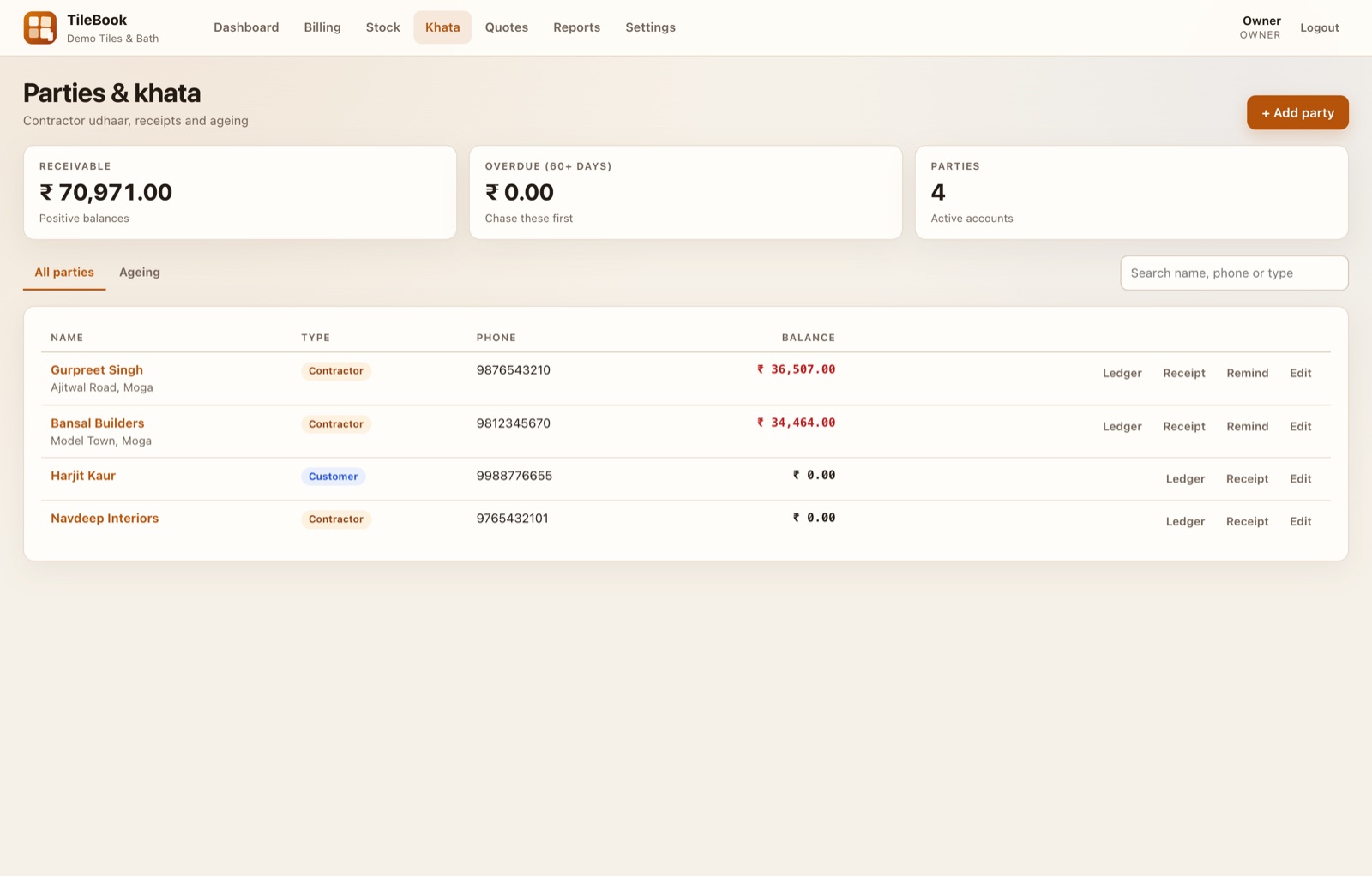
The khata — contractor dues, part payments and ageing.

Built for the counter

The three registers you keep, in one app.

Each part works the way a tile shop already works: boxes convert to square feet by the tile’s packing, stock is held per shade and lot, and credit goes to the party, not to a bill.

Billing

Bill by box, print by square feet.

Pick a tile, choose the shade and lot, enter boxes — TileBook converts to square feet from that tile’s packing and prices the line. Discounts and round-off sit where the customer can see them.

  • GST invoice with your GSTIN and a split by rate
  • Shade and batch printed on every line
  • Walk-in paid bills or a credit bill added to khata
  • Print the invoice, or edit and re-save the same bill
Billing screen with customer, date, tile line with shade lot, boxes, rate per square foot and a live bill summary with GST

Stock

Every shade, every lot, counted.

Purchases are recorded as lots with a shade code and purchase cost. Sales deduct from the lot you picked, and the movement history shows why the count changed.

  • Shade-wise boxes and square feet in stock
  • Minimum boxes per tile with a low-stock signal
  • Purchases, movements and a tile catalog
  • Stock value at purchase cost
Stock screen showing tiles with boxes, square feet, shade lots and minimum levels

Khata

Who owes what, and since when.

Credit bills and part payments stay against the party. The ledger shows every bill and receipt in order, and the outstanding list tells you who to call this week.

  • Party ledger with bills and payments
  • Outstanding and contractor ageing
  • Record a part payment without editing the bill
  • Phone number on the bill and the khata
Khata screen listing parties, their outstanding balances and the party ledger

Also on the counter

Small things that save the day.

Quotes

A quotation for a site, with wastage and the expected boxes, then convert it to a bill when the order comes.

Reports

Sales register, day-wise sales, tile-wise sales, stock, GST split and outstanding — with CSV for the accountant.

Owner and counter logins

The owner edits stock, purchases and settings. Counter staff bill and take payments without changing records.

Audit trail

Edits and deletions to bills, stock and payments are written to a log instead of disappearing.

Backup

The owner can download the shop database from Settings and copy it to a pen drive or cloud folder.

Your own letterhead

Shop name, address, phone, GSTIN, invoice prefix and accent colour are set once and print on every bill.

Pricing

Pay once. Keep the shop running.

One price for the software, no subscription and no per-bill charge. The licence is issued for the computer you install it on.

Lifetime licence

₹7,999one time

For one computer. GST invoice from Kapoor Dev on request.

Buy on WhatsApp

The licence key is issued after payment is confirmed. Tell us the computer's installation ID from the app's activation screen.

What the licence includes

  • Billing, stock, khata, quotes and reports on one computer
  • Owner and counter logins, with the audit trail
  • GST invoices, print-out and CSV exports
  • Offline activation — no internet needed to run
  • Installer for Windows or macOS (Apple silicon)
  • Setup help on WhatsApp when you install

Download

Install it on the counter computer.

Download the app for your computer, then enter the licence key on the activation screen. Your shop data is created on that computer and stays there.

Windows 10 / 11 · 64-bit

Windows app

Unzip the folder and run TileBook.exe. No install needed; keep the folder anywhere on the computer. 27 MB.

Download .zip

macOS · Apple silicon

Mac app

For M1, M2, M3 and newer Macs. Intel Macs are not supported by this build.

Download for Mac
  1. 01

    Download the app for your computer and open it.

  2. 02

    Copy the installation ID from the activation screen.

  3. 03

    Send the ID on WhatsApp and we issue your licence key after payment.

  4. 04

    Paste the key, run the shop setup once, and start billing.

Mac note: the app is not notarised with Apple yet. The first time, right-click the app and choose Open — after that it opens normally.

Questions

Before you buy.

Does TileBook work without internet?

Yes. Billing, stock, khata and reports run on the shop computer and the data is stored in a local database file. A connection is not needed to bill or print, and the licence check also happens offline.

How many computers can use one licence?

One licence covers one computer. If the counter and the owner’s laptop both need TileBook, each computer needs its own licence.

Is there a monthly fee?

No. The licence is a one-time payment of ₹7,999 for one computer. There is no subscription and no per-bill charge.

Can my counter staff use it without changing records?

Yes. The owner account can edit stock, purchases, prices and settings. A counter account can bill and take payments but cannot make the edits the owner should approve.

Does it create GST invoices?

Yes. Bills carry your GSTIN, a GST split by rate, discounts and round-off, and print as an invoice. The reports tab gives a sales register and a GST summary, plus CSV export for your accountant.

Will the Mac app open normally?

The macOS build is not notarised with Apple yet, so the first time you open it, right-click the app and choose Open. On Windows, unzip the folder and run TileBook.exe.

How do I back up my shop data?

The owner can download the shop database from Settings and copy it to a pen drive or a cloud folder. Everything stays on the shop’s own computer; nothing is uploaded to us.
Ready to move the registers into TileBook?

Install it on the counter computer, or ask on WhatsApp how the licence works.